From January 2015, she started to practice leetcode questions; she trains herself to stay focus, develops "muscle" memory when she practices those questions one by one.
2015年初, Julia开始参与做Leetcode, 开通自己第一个博客. 刷Leet code的题目, 她看了很多的代码, 每个人那学一点, 也开通Github, 发表自己的代码, 尝试写自己的一些体会.
She learns from her favorite sports – tennis, 10,000 serves practice builds up good memory for a great serve. Just keep going.
Hard work beats talent when talent fails to work hard.
Joe Idziorek, Principal Product Manager at AWS, outlines a purpose-built strategy for databases, where you choose the right tool for the job. Joe explains why your application should drive the requirements of a database, not the other way around. We introduce AWS databases that are purpose-built for your application use cases. Learn why you should select different database services to solve different aspects of an application, and watch a demonstration in which application use cases lend themselves well to specific data services. If you're a developer building modern applications that require high performance, scale, and functional databases, and you're trying to determine which relational and non-relational data services to use, this tech talk is for you.
Learning Objectives:
- Learn what purpose-built databases are
- Discover why you should use a purpose-built database when building an application
- Find out which database you should choose for your use case
IBM Graph is a fully managed property graph-as-a-service that enables you to store, query and visualize data points, connections and properties. Highly available Provides service that is always up and ensures your data is always accessible, so your web and mobile apps are constantly working for your business. Managed 24/7 Our experts monitor, manage and optimize everything in your stack, every day, all day. Enables your development team to focus on building apps, instead of worrying about the graph. Scales seamlessly Lets you start small and scale on demand as your data size and complexity increases, enabling your application to grow with your business.
Azure Cosmos DB
Azure Cosmos DB provides native support for NoSQL choices, offers multiple well-defined consistency models, guarantees single-digit-millisecond latencies at the 99th percentile, and guarantees high availability with multi-homing capabilities and low latencies anywhere in the world.
Cassandra
Cassandra's data model offers the convenience of column indexes with the performance of log-structured updates, strong support for denormalization and materialized views, and powerful built-in caching.
Amazon Neptune
Amazon Neptune is a fast, reliable, fully-managed graph database service that makes it easy to build and run applications that work with highly connected datasets. The core of Amazon Neptune is a purpose-built, high-performance graph database engine optimized for storing billions of relationships and querying the graph with milliseconds latency. Amazon Neptune supports popular graph models Property Graph and W3C's RDF, and their respective query languages Apache TinkerPop Gremlin and SPARQL, allowing you to easily build queries that efficiently navigate highly connected datasets. Neptune powers graph use cases such as recommendation engines, fraud detection, knowledge graphs, drug discovery, and network security. Amazon Neptune is highly available, with read replicas, point-in-time recovery, continuous backup to Amazon S3, and replication across Availability Zones. Neptune is secure with support for encryption at rest. Neptune is fully-managed, so you no longer need to worry about database management tasks such as hardware provisioning, software patching, setup, configuration, or backups.
Neo4j
Neo4j is the leading native graph database and graph platform. It is available a both open source and through a commercial license for enterprise levels of security and high performance and reliability through clustering. Neo4j's graph query language, Cypher is very easy to learn and can operate across Neo4j, Apache Spark and Gremlin-based products using newly released open source toolkits, "Cypher on Apache Spark (CApS) and Cypher for Gremlin. Neo4j also offers a complete graph platform that includes Neo4j Bloom for visual exploration, Neo4j ETL and Kettle integration for data integration, APOC procedures and graph analytic algorithm libraries and developer-friendly Neo4j Desktop development tools including Neo4j Browser.
A program called Covax wants to distribute Covid-19 vaccines fairly. Is it working?
Subscribe to our channel! http://goo.gl/0bsAjO
Early in the Covid-19 pandemic, many of the world’s richest countries poured money into the race for a vaccine. Billions of dollars, from programs like the US’s Operation Warp Speed, funded development that brought us multiple Covid-19 vaccines in record time. But it also determined where those vaccines would go. Before vaccine doses had even hit the market, places like the US and the UK had bought up nearly the entire supply.
This turns out to be an old story. In nearly every modern global health crisis, from smallpox to malaria to H1N1, rich countries have bought up vital medical supplies, making poor countries wait sometimes decades for life-saving support. It’s effectively a system in which where you live determines whether you live or die of a preventable disease. Leaving a disease like Covid-19 to spread unchecked in some places also gives it a chance to mutate -- and variants of the virus are already raising alarms. So: how do we get vaccines to countries that can’t afford them?
One solution underway is called Covax. It’s a program co-led by the World Health Organization; Gavi, The Vaccine Alliance; and the Coalition of Epidemic Preparedness Innovations (CEPI). Its goal is to get vaccines to lower- and middle-income countries at the same time as rich countries. So how is it supposed to do that? And will it be enough?
More from Vox.com’s Julia Belluz + Jen Kirby on Covax and vaccine nationalism:
https://www.vox.com/21448719/covid-19...https://www.vox.com/2021/2/24/2229898...https://www.vox.com/2021/1/29/2225390...
Duke Global Health Innovation Center data: https://launchandscalefaster.org/covi...
More on vaccine nationalism:
https://www.oxfam.org/en/press-releas...https://www.npr.org/sections/goatsand...
More on the H1N1 pandemic:
https://www.ncbi.nlm.nih.gov/pmc/arti...https://www.cdc.gov/flu/pandemic-reso...
Vox.com is a news website that helps you cut through the noise and understand what's really driving the events in the headlines. Check out http://www.vox.com.
As I discussed in my recent blog post on ProgrammableWeb.com, Netflix has found substantial limitations in the traditional one-size-fits-all (OSFA) REST API approach. As a result, we have moved to a new, fully customizable API. The basis for our decision is that Netflix’s streaming service is available on more than 800 different device types, almost all of which receive their content from our private APIs. In our experience, we have realized that supporting these myriad device types with an OSFA API, while successful, is not optimal for the API team, the UI teams or Netflix streaming customers. And given that the key audiences for the API are a small group of known developers to which the API team is very close (i.e., mostly internal Netflix UI development teams), we have evolved our API into a platform for API development. Supporting this platform are a few key philosophies, each of which is instrumental in the design of our new system. These philosophies are as follows:
Embrace the Differences of the Devices
Separate Content Gathering from Content Formatting/Delivery
Redefine the Border Between “Client” and “Server”
Distribute Innovation
I will go into more detail below about each of these, including our implementation and what the benefits (and potential detriments) are of this approach. However, each philosophy reflects our top-level goal: to provide whatever is best for the Netflix customer. If we can improve the interaction between the API and our UIs, we have a better chance of making more of our customers happier.
Now, the philosophies…
Embrace the Differences of the Devices
The key driver for this redesigned API is the fact that there are a range of differences across the 800+ device types that we support. Most APIs (including the REST API that Netflix has been using since 2008) treat these devices the same, in a generic way, to make the server-side implementations more efficient. And there is good reason for this approach. Providing an OSFA API allows the API team to maintain a solid contract with a wide range of API consumers because the API team is setting the rules for everyone to follow.
While effective, the problem with the OSFA approach is that its emphasis is to make it convenient for the API provider, not the API consumer. Accordingly, OSFA is ignoring the differences of these devices; the differences that allow us to more optimally take advantage of the rich features offered on each. To give you an idea of these differences, devices may differ on:
Memory capacity or processing power, potentially modifying how much content it can manage at a given time
Requirements for distinct markup formats and broader device proliferation increases the likelihood of this
Document models, some devices may perform better with flatter models, others with more hierarchical
Screen real estate which may impact the content elements that are needed
Document delivery, some performing better with bits streamed across HTTP rather than delivered as a complete document
User interactions, which could influence the metadata fields, delivery method, interaction model, etc.
Our new model is designed to cut against the OSFA paradigm and embrace the differences across devices while supporting those differences equally. To achieve this, our API development platform allows each UI team to create customized endpoints. So the request/response model can be optimized for each team’s UIs to account for unique or divergent device requirements. To support the variability in our request/response model, we need a different kind of architecture, which takes us to the next philosophy…
Separate Content Gathering from Content Formatting/Delivery
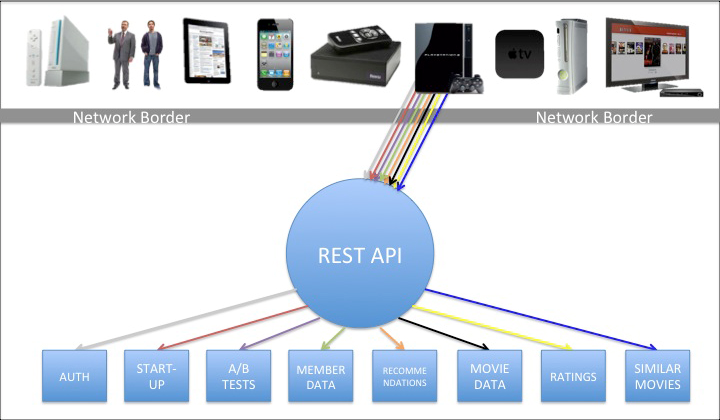
In many OSFA implementations, the API is the engine that retrieves the content from the source(s), prepares that payload, and then ultimately delivers it. Historically, this implementation is also how the Netflix REST API has operated, which is loosely represented by the following image:
The above diagram shows a rainbow of colors roughly representing some of the different requests needed for the PS3, as an example, to start the Netflix experience. Other UIs will have a similar set of interactions against the OSFA REST API given that they are all required by the API to adhere to roughly the same set of rules. Inside the REST API is the engine that performs the gathering, preparation and delivery of the content (indifferent to which UI made the request).
Our new API has departed from the OSFA API model towards one that enables fine-grained customizations without compromising overall system manageability. To achieve this model, our new architecture clearly separates the operations of content gathering from content formatting and delivery. The following diagram represents this modified architecture:
In this new model, the UIs make a single request to a custom endpoint that is designed to specifically handle that request. Behind the endpoint is a handler that parses the request and calls the Java API, which gathers the content by calling back to a range of dependent services. We will discuss in later posts how we do this, particularly in how we parse the requests, trigger calls to dependencies, handle concurrency, support fallbacks, as well as other techniques we use to ensure optimized and accurate gathering of the content. For now, though, I will just say that the content gathering from the Java API is generic and independent of destination, just like the OSFA approach.
After the content has been gathered, however, it is handed off to the formatting and delivery engines which sit on top of the Java API on the server. The diagram represents this layer by showing an array of different devices resting on top of the Java API, each of which corresponds to the custom endpoints for a given UI and/or set of devices. The custom endpoints, as mentioned earlier, support optimized request/response handling for that device, which takes us to the next philosophy…
Redefine the Border Between “Client” and “Server”
The traditional definition of “client code” is all code that lives on a given device or UI. “Server code” is typically defined as the code that resides on the server. The divide between the two is the network border. This is often the case for REST APIs and that border is where the contract between the API provider and API consumer is engaged, as was the case for Netflix’s REST API, as shown below:
In our new approach, we are pushing this border back to the server, and with it goes a substantial portion of the UI-specific content processing. All of the code on the device is still considered client code, but some client code now resides on the server. In essence, the client code on the device makes a network call back to a dedicated client adapter that resides on the server behind the custom endpoint. Once back on the server, the adapter (currently written in Groovy) explodes that request out to a series of server-side calls that get the corresponding content (in some cases, roughly the same rainbow of requests that would be handled across HTTP in our old REST API). At that point, the Java APIs perform their content gathering functions and deliver the requested content back to the adapter. Once the adapter has some or all of its content, the adapter processes it for delivery, which includes pruning out unwanted fields, error handling and retries, formatting the response, and delivering the document header and body. All of this processing is custom to the specific UI. This new definition of client/server is represented in the following diagram:
There are two major aspects to this change. First, it allows for more efficient interactions between the device and the server since most calls that otherwise would be going across the network can be handled on the server. Of course, network calls are the most expensive part of the transaction, so reducing the number of network requests improves performance, in some cases by several seconds. The second key component leads us to the final (and perhaps most important) philosophy to this approach, which is the distribution of the work for building out the optimized adapters.
Distribute Innovation
One expected critique with this approach is that as we add more devices and build more UIs for A/B and multivariate tests, there will undoubtedly be myriad adapters needed to support all of these distinct request profiles. How can we innovate rapidly and support such a diverse (and growing) set of interactions? It is critical for us to support the custom adapters, but it is equally important for us to maintain a high rate of innovation across these UIs and devices.
As described above, pushing some of the client code back to the servers and providing custom endpoints gives us the opportunity to distribute the API development to the UI teams. We are able to do this because the consumers of this private API are the Netflix UI and device teams. Given that the UI teams can create and modify their own adapter code (potentially without any intervention or involvement from the API team), they can be much more nimble in their development. In other words, as long as the content is available in the Java API, the UI teams can change the code that lives on the device to support the user experience and at the same time change the adapter code to deliver the payload needed for that experience. They are no longer bound by server teams dictating the rules and/or being a bottleneck for their development. API innovation is now in the hands of the UI teams! Moreover, because these adapters are isolated from each other, this approach also diminishes the risk of harming other device implementations with tactical changes in their device-specific APIs.
Of course, one drawback to this is that UI teams are often more skilled in technologies like HTML5, CSS3, JavaScript, etc. In this system, they now need to learn server-side technologies and techniques. So far, however, this has been a relatively small issue, especially since our engineering culture is to hire very strong, senior-level engineers who are adaptable, curious and passionate about learning and implementing these kinds of solutions. Another concern is that because the UI teams are implementing server-side adapters, they have the potential to bring down the servers through infinite loops or other processes that are resource intensive. To offset this, we are working on scrubbing engines that will hopefully minimize the likelihood of such mistakes. That said, in the OSFA world, code on the device can just as easily DDOS the server, it is just potentially a bigger problem if it runs on the server.
Example of how this new system works:
A device, such as the PS3, makes a single request across the network to load the home screen (This code is written and supported by the PS3 UI team.
A Groovy adapter receives and parses the PS3 request (PS3 UI team)
The adapter explodes that one request into many requests that call the Java API to (PS3 UI team)
Each Java API calls back to a dependent service, concurrently when appropriate, to gather the content needed for that sub-request (API team)
In the Java API, if a dependent service unavailable or returns a 4xx or 5xx, the Java API returns a fallback and/or an error code to the adapter (API team)
Successful Java API transactions then return the content back to the adapter when each thread has completed (API team)
The adapter can handle the responses from each thread progressively or all together, depending on how the UI team wants to handle it (PS3 UI team)
The adapter then manipulates the content, retrieves the wanted (and prunes out the unwanted) elements, handle errors, etc. (PS3 UI team)
The adapter formats the response in preparation for delivery back across the network to the PS3, which includes everything needed for the PS3 home screen in the single payload (PS3 UI team)
The adapter finally handles the delivery of the payload across the network (PS3 UI team)
The device will then parse this optimized response and populate the UI (PS3 UI team)
We are still in the early stages of this new system. Some of our devices have fully migrated over to it, others are split between it and the REST API, and others are just getting their feet wet. In upcoming posts, we will share more about the deeper technical aspects of the system, including the way we handle concurrency, how we manage the adapters, the interaction between the adapters and the Java API, our Groovy implementation, error handling, etc. We will also continue to share the evolution of this system as we learn more about it.
In the meantime, if you are interested in building high-scale, cloud-based solutions such as this one, we are hiring!
Daniel Jacobson (@daniel_jacobson), Director of Engineering — Netflix API
I like to spend 20 minutes to read the article, make some highlights, and get concrete ideas how to implement one.
Pattern: API Gateway / Backends for Frontends
Context
Let’s imagine you are building an online store that uses the Microservice architecture pattern and that you are implementing the product details page. You need to develop multiple versions of the product details user interface:
HTML5/JavaScript-based UI for desktop and mobile browsers - HTML is generated by a server-side web application
Native Android and iPhone clients - these clients interact with the server via REST APIs
In addition, the online store must expose product details via a REST API for use by 3rd party applications.
A product details UI can display a lot of information about a product. For example, the Amazon.com details page for POJOs in Action displays:
Basic information about the book such as title, author, price, etc.
Your purchase history for the book
Availability
Buying options
Other items that are frequently bought with this book
Other items bought by customers who bought this book
Customer reviews
Sellers ranking
…
Since the online store uses the Microservice architecture pattern the product details data is spread over multiple services. For example,
Product Info Service - basic information about the product such as title, author
Pricing Service - product price
Order service - purchase history for product
Inventory service - product availability
Review service - customer reviews …
Consequently, the code that displays the product details needs to fetch information from all of these services.
Problem
How do the clients of a Microservices-based application access the individual services?
Forces
The granularity of APIs provided by microservices is often different than what a client needs. Microservices typically provide fine-grained APIs, which means that clients need to interact with multiple services. For example, as described above, a client needing the details for a product needs to fetch data from numerous services.
Different clients need different data. For example, the desktop browser version of a product details page desktop is typically more elaborate then the mobile version.
Network performance is different for different types of clients. For example, a mobile network is typically much slower and has much higher latency than a non-mobile network. And, of course, any WAN is much slower than a LAN. This means that a native mobile client uses a network that has very difference performance characteristics than a LAN used by a server-side web application. The server-side web application can make multiple requests to backend services without impacting the user experience where as a mobile client can only make a few.
The number of service instances and their locations (host+port) changes dynamically
Partitioning into services can change over time and should be hidden from clients
Services might use a diverse set of protocols, some of which might not be web friendly
Solution
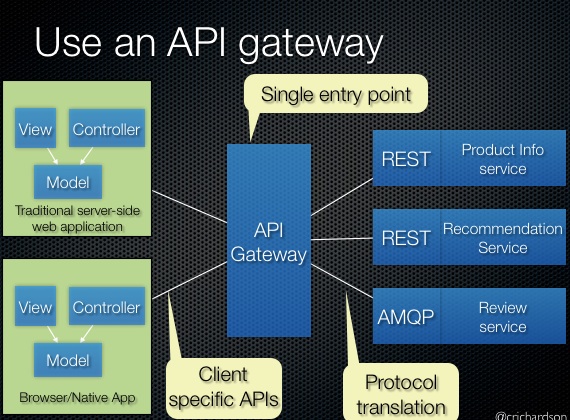
Implement an API gateway that is the single entry point for all clients. The API gateway handles requests in one of two ways. Some requests are simply proxied/routed to the appropriate service. It handles other requests by fanning out to multiple services.
Rather than provide a one-size-fits-all style API, the API gateway can expose a different API for each client. For example, the Netflix API gateway runs client-specific adapter code that provides each client with an API that’s best suited to its requirements.
The API gateway might also implement security, e.g. verify that the client is authorized to perform the request
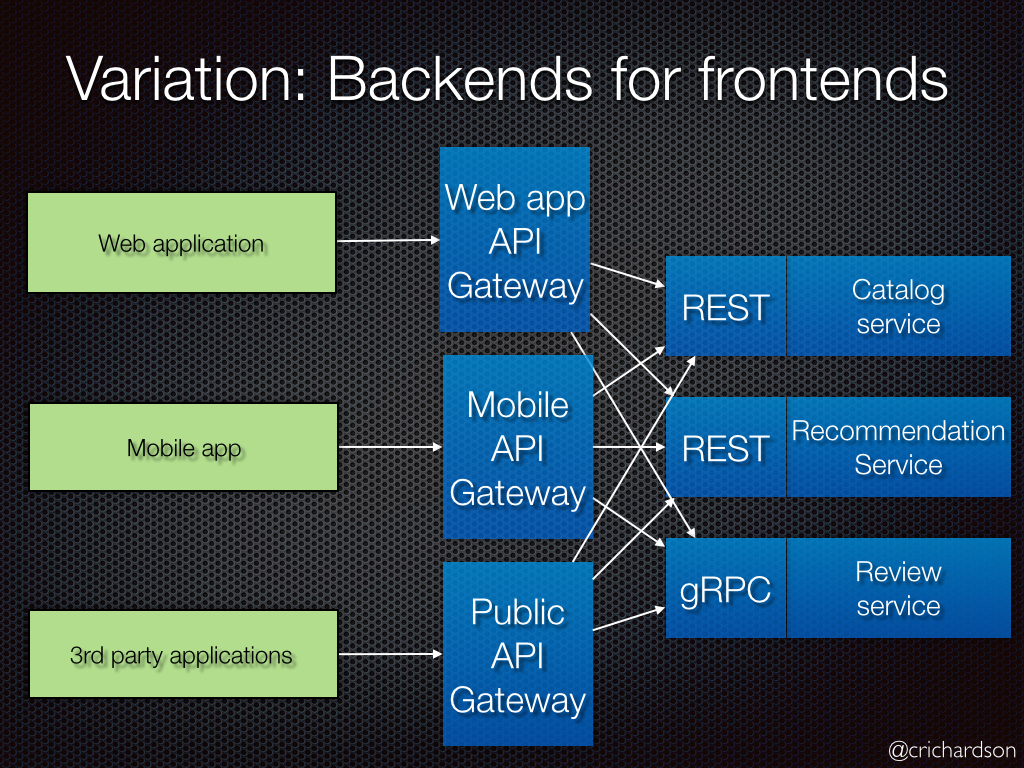
Variation: Backends for frontends
A variation of this pattern is the Backends for frontends pattern. It defines a separate API gateway for each kind of client.
In this example, there are three kinds of clients: web application, mobile application, and external 3rd party application. There are three different API gateways. Each one is provides an API for its client.
Insulates the clients from how the application is partitioned into microservices
Insulates the clients from the problem of determining the locations of service instances
Provides the optimal API for each client
Reduces the number of requests/roundtrips. For example, the API gateway enables clients to retrieve data from multiple services with a single round-trip. Fewer requests also means less overhead and improves the user experience. An API gateway is essential for mobile applications.
Simplifies the client by moving logic for calling multiple services from the client to API gateway
Translates from a “standard” public web-friendly API protocol to whatever protocols are used internally
The API gateway pattern has some drawbacks:
Increased complexity - the API gateway is yet another moving part that must be developed, deployed and managed
Increased response time due to the additional network hop through the API gateway - however, for most applications the cost of an extra roundtrip is insignificant.
Issues:
How implement the API gateway? An event-driven/reactive approach is best if it must scale to scale to handle high loads. On the JVM, NIO-based libraries such as Netty, Spring Reactor, etc. make sense. NodeJS is another option.