June 23, 2021
Introduction
It should be easy for me to go over the article and complete the reading around one hour. I like to try a few times, and then I will go back to continue to read more content about HIVE book.
Here is the article.
Introduction
The Hadoop Distributed File System (HDFS) is a distributed file system designed to run on commodity hardware. It has many similarities with existing distributed file systems. However, the differences from other distributed file systems are significant. HDFS is highly fault-tolerant and is designed to be deployed on low-cost hardware. HDFS provides high throughput access to application data and is suitable for applications that have large data sets. HDFS relaxes a few POSIX requirements to enable streaming access to file system data. HDFS was originally built as infrastructure for the Apache Nutch web search engine project. HDFS is part of the Apache Hadoop Core project. The project URL is http://hadoop.apache.org/.
Assumptions and Goals
Hardware Failure
Hardware failure is the norm rather than the exception. An HDFS instance may consist of hundreds or thousands of server machines, each storing part of the file system’s data. The fact that there are a huge number of components and that each component has a non-trivial probability of failure means that some component of HDFS is always non-functional. Therefore, detection of faults and quick, automatic recovery from them is a core architectural goal of HDFS.
Streaming Data Access
Applications that run on HDFS need streaming access to their data sets. They are not general purpose applications that typically run on general purpose file systems. HDFS is designed more for batch processing rather than interactive use by users. The emphasis is on high throughput of data access rather than low latency of data access. POSIX imposes many hard requirements that are not needed for applications that are targeted for HDFS. POSIX semantics in a few key areas has been traded to increase data throughput rates.
Large Data Sets
Applications that run on HDFS have large data sets. A typical file in HDFS is gigabytes to terabytes in size. Thus, HDFS is tuned to support large files. It should provide high aggregate data bandwidth and scale to hundreds of nodes in a single cluster. It should support tens of millions of files in a single instance.
Simple Coherency Model
HDFS applications need a write-once-read-many access model for files. A file once created, written, and closed need not be changed except for appends and truncates. Appending the content to the end of the files is supported but cannot be updated at arbitrary point. This assumption simplifies data coherency issues and enables high throughput data access. A MapReduce application or a web crawler application fits perfectly with this model.
“Moving Computation is Cheaper than Moving Data”
A computation requested by an application is much more efficient if it is executed near the data it operates on. This is especially true when the size of the data set is huge. This minimizes network congestion and increases the overall throughput of the system. The assumption is that it is often better to migrate the computation closer to where the data is located rather than moving the data to where the application is running. HDFS provides interfaces for applications to move themselves closer to where the data is located.
Portability Across Heterogeneous Hardware and Software Platforms
HDFS has been designed to be easily portable from one platform to another. This facilitates widespread adoption of HDFS as a platform of choice for a large set of applications.
NameNode and DataNodes
HDFS has a master/slave architecture. An HDFS cluster consists of a single NameNode, a master server that manages the file system namespace and regulates access to files by clients. In addition, there are a number of DataNodes, usually one per node in the cluster, which manage storage attached to the nodes that they run on. HDFS exposes a file system namespace and allows user data to be stored in files. Internally, a file is split into one or more blocks and these blocks are stored in a set of DataNodes. The NameNode executes file system namespace operations like opening, closing, and renaming files and directories. It also determines the mapping of blocks to DataNodes. The DataNodes are responsible for serving read and write requests from the file system’s clients. The DataNodes also perform block creation, deletion, and replication upon instruction from the NameNode.
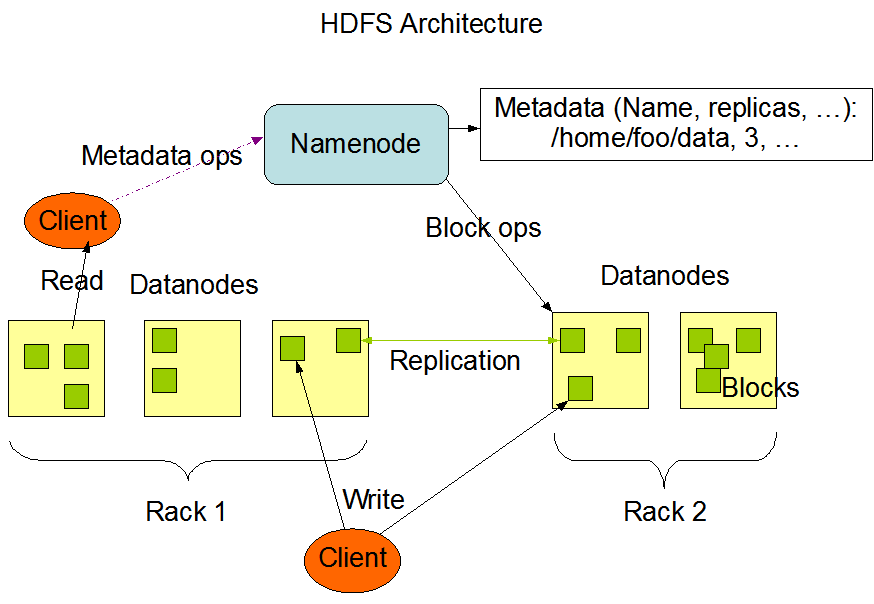
The NameNode and DataNode are pieces of software designed to run on commodity machines. These machines typically run a GNU/Linux operating system (OS). HDFS is built using the Java language; any machine that supports Java can run the NameNode or the DataNode software. Usage of the highly portable Java language means that HDFS can be deployed on a wide range of machines. A typical deployment has a dedicated machine that runs only the NameNode software. Each of the other machines in the cluster runs one instance of the DataNode software. The architecture does not preclude running multiple DataNodes on the same machine but in a real deployment that is rarely the case.
The existence of a single NameNode in a cluster greatly simplifies the architecture of the system. The NameNode is the arbitrator and repository for all HDFS metadata. The system is designed in such a way that user data never flows through the NameNode.
The File System Namespace
HDFS supports a traditional hierarchical file organization. A user or an application can create directories and store files inside these directories. The file system namespace hierarchy is similar to most other existing file systems; one can create and remove files, move a file from one directory to another, or rename a file. HDFS supports user quotas and access permissions. HDFS does not support hard links or soft links. However, the HDFS architecture does not preclude implementing these features.
While HDFS follows naming convention of the FileSystem, some paths and names (e.g. /.reserved and .snapshot ) are reserved. Features such as transparent encryption and snapshot use reserved paths.
The NameNode maintains the file system namespace. Any change to the file system namespace or its properties is recorded by the NameNode. An application can specify the number of replicas of a file that should be maintained by HDFS. The number of copies of a file is called the replication factor of that file. This information is stored by the NameNode.
Data Replication
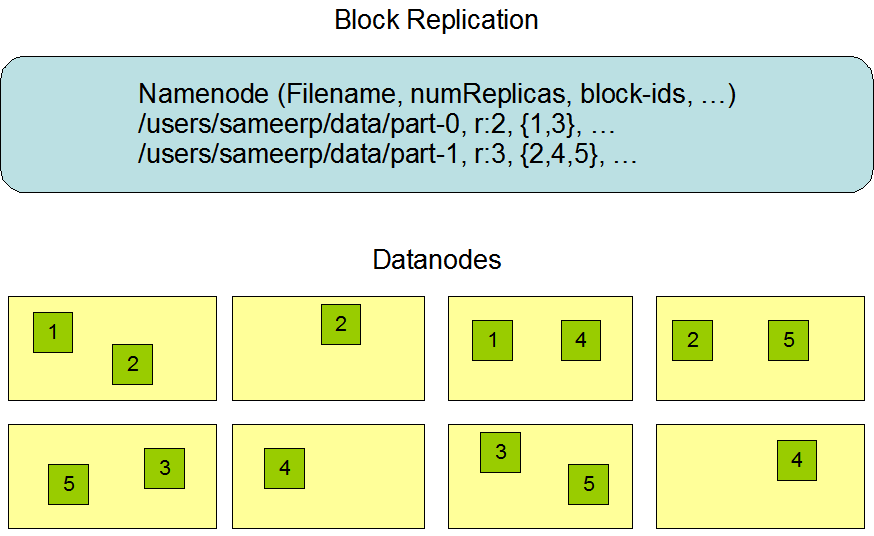
HDFS is designed to reliably store very large files across machines in a large cluster. It stores each file as a sequence of blocks. The blocks of a file are replicated for fault tolerance. The block size and replication factor are configurable per file.
All blocks in a file except the last block are the same size, while users can start a new block without filling out the last block to the configured block size after the support for variable length block was added to append and hsync.
An application can specify the number of replicas of a file. The replication factor can be specified at file creation time and can be changed later. Files in HDFS are write-once (except for appends and truncates) and have strictly one writer at any time.
The NameNode makes all decisions regarding replication of blocks. It periodically receives a Heartbeat and a Blockreport from each of the DataNodes in the cluster. Receipt of a Heartbeat implies that the DataNode is functioning properly. A Blockreport contains a list of all blocks on a DataNode.
Replica Placement: The First Baby Steps
The placement of replicas is critical to HDFS reliability and performance. Optimizing replica placement distinguishes HDFS from most other distributed file systems. This is a feature that needs lots of tuning and experience. The purpose of a rack-aware replica placement policy is to improve data reliability, availability, and network bandwidth utilization. The current implementation for the replica placement policy is a first effort in this direction. The short-term goals of implementing this policy are to validate it on production systems, learn more about its behavior, and build a foundation to test and research more sophisticated policies.
Large HDFS instances run on a cluster of computers that commonly spread across many racks. Communication between two nodes in different racks has to go through switches. In most cases, network bandwidth between machines in the same rack is greater than network bandwidth between machines in different racks.
The NameNode determines the rack id each DataNode belongs to via the process outlined in Hadoop Rack Awareness. A simple but non-optimal policy is to place replicas on unique racks. This prevents losing data when an entire rack fails and allows use of bandwidth from multiple racks when reading data. This policy evenly distributes replicas in the cluster which makes it easy to balance load on component failure. However, this policy increases the cost of writes because a write needs to transfer blocks to multiple racks.
For the common case, when the replication factor is three, HDFS’s placement policy is to put one replica on the local machine if the writer is on a datanode, otherwise on a random datanode in the same rack as that of the writer, another replica on a node in a different (remote) rack, and the last on a different node in the same remote rack. This policy cuts the inter-rack write traffic which generally improves write performance. The chance of rack failure is far less than that of node failure; this policy does not impact data reliability and availability guarantees. However, it does not reduce the aggregate network bandwidth used when reading data since a block is placed in only two unique racks rather than three. With this policy, the replicas of a block do not evenly distribute across the racks. Two replicas are on different nodes of one rack and the remaining replica is on a node of one of the other racks. This policy improves write performance without compromising data reliability or read performance.
If the replication factor is greater than 3, the placement of the 4th and following replicas are determined randomly while keeping the number of replicas per rack below the upper limit (which is basically (replicas - 1) / racks + 2).
Because the NameNode does not allow DataNodes to have multiple replicas of the same block, maximum number of replicas created is the total number of DataNodes at that time.
After the support for Storage Types and Storage Policies was added to HDFS, the NameNode takes the policy into account for replica placement in addition to the rack awareness described above. The NameNode chooses nodes based on rack awareness at first, then checks that the candidate node have storage required by the policy associated with the file. If the candidate node does not have the storage type, the NameNode looks for another node. If enough nodes to place replicas can not be found in the first path, the NameNode looks for nodes having fallback storage types in the second path.
The current, default replica placement policy described here is a work in progress.
Replica Selection
To minimize global bandwidth consumption and read latency, HDFS tries to satisfy a read request from a replica that is closest to the reader. If there exists a replica on the same rack as the reader node, then that replica is preferred to satisfy the read request. If HDFS cluster spans multiple data centers, then a replica that is resident in the local data center is preferred over any remote replica.
Block Placement Policies
As mentioned above when the replication factor is three, HDFS’s placement policy is to put one replica on the local machine if the writer is on a datanode, otherwise on a random datanode in the same rack as that of the writer, another replica on a node in a different (remote) rack, and the last on a different node in the same remote rack. If the replication factor is greater than 3, the placement of the 4th and following replicas are determined randomly while keeping the number of replicas per rack below the upper limit (which is basically (replicas - 1) / racks + 2). Additional to this HDFS supports 4 different pluggable Block Placement Policies. Users can choose the policy based on their infrastructre and use case. By default HDFS supports BlockPlacementPolicyDefault.
Safemode
On startup, the NameNode enters a special state called Safemode. Replication of data blocks does not occur when the NameNode is in the Safemode state. The NameNode receives Heartbeat and Blockreport messages from the DataNodes. A Blockreport contains the list of data blocks that a DataNode is hosting. Each block has a specified minimum number of replicas. A block is considered safely replicated when the minimum number of replicas of that data block has checked in with the NameNode. After a configurable percentage of safely replicated data blocks checks in with the NameNode (plus an additional 30 seconds), the NameNode exits the Safemode state. It then determines the list of data blocks (if any) that still have fewer than the specified number of replicas. The NameNode then replicates these blocks to other DataNodes.
The Persistence of File System Metadata
The HDFS namespace is stored by the NameNode. The NameNode uses a transaction log called the EditLog to persistently record every change that occurs to file system metadata. For example, creating a new file in HDFS causes the NameNode to insert a record into the EditLog indicating this. Similarly, changing the replication factor of a file causes a new record to be inserted into the EditLog. The NameNode uses a file in its local host OS file system to store the EditLog. The entire file system namespace, including the mapping of blocks to files and file system properties, is stored in a file called the FsImage. The FsImage is stored as a file in the NameNode’s local file system too.
The NameNode keeps an image of the entire file system namespace and file Blockmap in memory. When the NameNode starts up, or a checkpoint is triggered by a configurable threshold, it reads the FsImage and EditLog from disk, applies all the transactions from the EditLog to the in-memory representation of the FsImage, and flushes out this new version into a new FsImage on disk. It can then truncate the old EditLog because its transactions have been applied to the persistent FsImage. This process is called a checkpoint. The purpose of a checkpoint is to make sure that HDFS has a consistent view of the file system metadata by taking a snapshot of the file system metadata and saving it to FsImage. Even though it is efficient to read a FsImage, it is not efficient to make incremental edits directly to a FsImage. Instead of modifying FsImage for each edit, we persist the edits in the Editlog. During the checkpoint the changes from Editlog are applied to the FsImage. A checkpoint can be triggered at a given time interval (dfs.namenode.checkpoint.period) expressed in seconds, or after a given number of filesystem transactions have accumulated (dfs.namenode.checkpoint.txns). If both of these properties are set, the first threshold to be reached triggers a checkpoint.
The DataNode stores HDFS data in files in its local file system. The DataNode has no knowledge about HDFS files. It stores each block of HDFS data in a separate file in its local file system. The DataNode does not create all files in the same directory. Instead, it uses a heuristic to determine the optimal number of files per directory and creates subdirectories appropriately. It is not optimal to create all local files in the same directory because the local file system might not be able to efficiently support a huge number of files in a single directory. When a DataNode starts up, it scans through its local file system, generates a list of all HDFS data blocks that correspond to each of these local files, and sends this report to the NameNode. The report is called the Blockreport.
The Communication Protocols
All HDFS communication protocols are layered on top of the TCP/IP protocol. A client establishes a connection to a configurable TCP port on the NameNode machine. It talks the ClientProtocol with the NameNode. The DataNodes talk to the NameNode using the DataNode Protocol. A Remote Procedure Call (RPC) abstraction wraps both the Client Protocol and the DataNode Protocol. By design, the NameNode never initiates any RPCs. Instead, it only responds to RPC requests issued by DataNodes or clients.
Robustness
The primary objective of HDFS is to store data reliably even in the presence of failures. The three common types of failures are NameNode failures, DataNode failures and network partitions.
Data Disk Failure, Heartbeats and Re-Replication
Each DataNode sends a Heartbeat message to the NameNode periodically. A network partition can cause a subset of DataNodes to lose connectivity with the NameNode. The NameNode detects this condition by the absence of a Heartbeat message. The NameNode marks DataNodes without recent Heartbeats as dead and does not forward any new IO requests to them. Any data that was registered to a dead DataNode is not available to HDFS any more. DataNode death may cause the replication factor of some blocks to fall below their specified value. The NameNode constantly tracks which blocks need to be replicated and initiates replication whenever necessary. The necessity for re-replication may arise due to many reasons: a DataNode may become unavailable, a replica may become corrupted, a hard disk on a DataNode may fail, or the replication factor of a file may be increased.
The time-out to mark DataNodes dead is conservatively long (over 10 minutes by default) in order to avoid replication storm caused by state flapping of DataNodes. Users can set shorter interval to mark DataNodes as stale and avoid stale nodes on reading and/or writing by configuration for performance sensitive workloads.
Cluster Rebalancing
The HDFS architecture is compatible with data rebalancing schemes. A scheme might automatically move data from one DataNode to another if the free space on a DataNode falls below a certain threshold. In the event of a sudden high demand for a particular file, a scheme might dynamically create additional replicas and rebalance other data in the cluster. These types of data rebalancing schemes are not yet implemented.
Data Integrity
It is possible that a block of data fetched from a DataNode arrives corrupted. This corruption can occur because of faults in a storage device, network faults, or buggy software. The HDFS client software implements checksum checking on the contents of HDFS files. When a client creates an HDFS file, it computes a checksum of each block of the file and stores these checksums in a separate hidden file in the same HDFS namespace. When a client retrieves file contents it verifies that the data it received from each DataNode matches the checksum stored in the associated checksum file. If not, then the client can opt to retrieve that block from another DataNode that has a replica of that block.
Metadata Disk Failure
The FsImage and the EditLog are central data structures of HDFS. A corruption of these files can cause the HDFS instance to be non-functional. For this reason, the NameNode can be configured to support maintaining multiple copies of the FsImage and EditLog. Any update to either the FsImage or EditLog causes each of the FsImages and EditLogs to get updated synchronously. This synchronous updating of multiple copies of the FsImage and EditLog may degrade the rate of namespace transactions per second that a NameNode can support. However, this degradation is acceptable because even though HDFS applications are very data intensive in nature, they are not metadata intensive. When a NameNode restarts, it selects the latest consistent FsImage and EditLog to use.
Another option to increase resilience against failures is to enable High Availability using multiple NameNodes either with a shared storage on NFS or using a distributed edit log (called Journal). The latter is the recommended approach.
Snapshots
Snapshots support storing a copy of data at a particular instant of time. One usage of the snapshot feature may be to roll back a corrupted HDFS instance to a previously known good point in time.
Data Organization
Data Blocks
HDFS is designed to support very large files. Applications that are compatible with HDFS are those that deal with large data sets. These applications write their data only once but they read it one or more times and require these reads to be satisfied at streaming speeds. HDFS supports write-once-read-many semantics on files. A typical block size used by HDFS is 128 MB. Thus, an HDFS file is chopped up into 128 MB chunks, and if possible, each chunk will reside on a different DataNode.
Replication Pipelining
When a client is writing data to an HDFS file with a replication factor of three, the NameNode retrieves a list of DataNodes using a replication target choosing algorithm. This list contains the DataNodes that will host a replica of that block. The client then writes to the first DataNode. The first DataNode starts receiving the data in portions, writes each portion to its local repository and transfers that portion to the second DataNode in the list. The second DataNode, in turn starts receiving each portion of the data block, writes that portion to its repository and then flushes that portion to the third DataNode. Finally, the third DataNode writes the data to its local repository. Thus, a DataNode can be receiving data from the previous one in the pipeline and at the same time forwarding data to the next one in the pipeline. Thus, the data is pipelined from one DataNode to the next.
Accessibility
HDFS can be accessed from applications in many different ways. Natively, HDFS provides a FileSystem Java API for applications to use. A C language wrapper for this Java API and REST API is also available. In addition, an HTTP browser and can also be used to browse the files of an HDFS instance. By using NFS gateway, HDFS can be mounted as part of the client’s local file system.
FS Shell
HDFS allows user data to be organized in the form of files and directories. It provides a commandline interface called FS shell that lets a user interact with the data in HDFS. The syntax of this command set is similar to other shells (e.g. bash, csh) that users are already familiar with. Here are some sample action/command pairs:
| Action | Command |
|---|
| Create a directory named /foodir | bin/hadoop dfs -mkdir /foodir |
| Remove a directory named /foodir | bin/hadoop fs -rm -R /foodir |
| View the contents of a file named /foodir/myfile.txt | bin/hadoop dfs -cat /foodir/myfile.txt |
FS shell is targeted for applications that need a scripting language to interact with the stored data.
DFSAdmin
The DFSAdmin command set is used for administering an HDFS cluster. These are commands that are used only by an HDFS administrator. Here are some sample action/command pairs:
| Action | Command |
|---|
| Put the cluster in Safemode | bin/hdfs dfsadmin -safemode enter |
| Generate a list of DataNodes | bin/hdfs dfsadmin -report |
| Recommission or decommission DataNode(s) | bin/hdfs dfsadmin -refreshNodes |
Browser Interface
A typical HDFS install configures a web server to expose the HDFS namespace through a configurable TCP port. This allows a user to navigate the HDFS namespace and view the contents of its files using a web browser.
Space Reclamation
File Deletes and Undeletes
If trash configuration is enabled, files removed by FS Shell is not immediately removed from HDFS. Instead, HDFS moves it to a trash directory (each user has its own trash directory under /user/<username>/.Trash). The file can be restored quickly as long as it remains in trash.
Most recent deleted files are moved to the current trash directory (/user/<username>/.Trash/Current), and in a configurable interval, HDFS creates checkpoints (under /user/<username>/.Trash/<date>) for files in current trash directory and deletes old checkpoints when they are expired. See expunge command of FS shell about checkpointing of trash.
After the expiry of its life in trash, the NameNode deletes the file from the HDFS namespace. The deletion of a file causes the blocks associated with the file to be freed. Note that there could be an appreciable time delay between the time a file is deleted by a user and the time of the corresponding increase in free space in HDFS.
Following is an example which will show how the files are deleted from HDFS by FS Shell. We created 2 files (test1 & test2) under the directory delete
$ hadoop fs -mkdir -p delete/test1
$ hadoop fs -mkdir -p delete/test2
$ hadoop fs -ls delete/
Found 2 items
drwxr-xr-x   - hadoop hadoop          0 2015-05-08 12:39 delete/test1
drwxr-xr-x   - hadoop hadoop          0 2015-05-08 12:40 delete/test2
We are going to remove the file test1. The comment below shows that the file has been moved to Trash directory.
$ hadoop fs -rm -r delete/test1
Moved: hdfs://localhost:8020/user/hadoop/delete/test1 to trash at: hdfs://localhost:8020/user/hadoop/.Trash/Current
now we are going to remove the file with skipTrash option, which will not send the file to Trash.It will be completely removed from HDFS.
$ hadoop fs -rm -r -skipTrash delete/test2
Deleted delete/test2
We can see now that the Trash directory contains only file test1.
$ hadoop fs -ls .Trash/Current/user/hadoop/delete/
Found 1 items\
drwxr-xr-x   - hadoop hadoop          0 2015-05-08 12:39 .Trash/Current/user/hadoop/delete/test1
So file test1 goes to Trash and file test2 is deleted permanently.
Decrease Replication Factor
When the replication factor of a file is reduced, the NameNode selects excess replicas that can be deleted. The next Heartbeat transfers this information to the DataNode. The DataNode then removes the corresponding blocks and the corresponding free space appears in the cluster. Once again, there might be a time delay between the completion of the setReplication API call and the appearance of free space in the cluster.
References
Hadoop JavaDoc API.
HDFS source code: http://hadoop.apache.org/version_control.html
Actionable Items:
- I like to watch a few videos about Hadoop first, and then come back to read again this article.
- Hadoop vs Hadoop File sytem (HDFS)
- Hadoop - storage - HDFS, data processing - MapReduce


