Friday, August 26, 2022

Leslie Lamport

 Leslie B. Lamport (born February 7, 1941 in Brooklyn) is an American computer scientist. Lamport is best known for his seminal work in distributed systems, and as the initial developer of the document preparation system LaTeX and the author of its first manual.[2] Lamport was the winner of the 2013 Turing Award[3] for imposing clear, well-defined coherence on the seemingly chaotic behavior of distributed computing systems, in which several autonomous computers communicate with each other by passing messages. He devised important algorithms and developed formal modeling and verification protocols that improve the quality of real distributed systems. These contributions have resulted in improved correctness, performance, and reliability of computer systems.[4][5][6][7][8]

Early life and education[edit]

Lamport was born into a Jewish family in Brooklyn, New York, the son of Benjamin and Hannah Lamport (née Lasser).[9] His father was an immigrant from Volkovisk in the Russian Empire (now VawkavyskBelarus)[10] and his mother was an immigrant from the Austro-Hungarian Empire, now southeastern Poland.

A graduate of Bronx High School of Science, Lamport received a B.S. in mathematics from the Massachusetts Institute of Technology in 1960, followed by M.A. (1963) and Ph.D. (1972) degrees in mathematics from Brandeis University.[11] His dissertation is about singularities in analytic partial differential equations.[12]

Career and research[edit]

Lamport worked as a computer scientist at Massachusetts Computer Associates from 1970 to 1977, SRI International from 1977 to 1985, and Digital Equipment Corporation and Compaq from 1985 to 2001. In 2001 he joined Microsoft Research in California.[11]

Distributed systems[edit]

Lamport's research contributions have laid the foundations of the theory of distributed systems. Among his most notable papers are

These papers relate to such concepts as logical clocks (and the happened-before relationship) and Byzantine failures. They are among the most cited papers in the field of computer science,[18] and describe algorithms to solve many fundamental problems in distributed systems, including:

The Man Who Revolutionized Computer Science With Math

 Here is the link. 

Leetcode discuss: 94. Binary Tree Inorder Traversal

Here is the link. 

C# | Quick learner | 3+ solutions | recursive function | stack | Morris traversal

August 23, 2022

I like to review C# solutions in discuss post, and then write a solution using recursive, a stack, and a solution without using recursive or stack - using Morris order traversal. The time complexity is O(N), N is total number of nodes in the tree, space optimal is O(1) using Morris order traversal.

The following are 4 solutions I like to share.

Solution 1:
I choose to use C# List and also write a function to pass List as a function argument, so all nodes in the tree will be visited once and be added to List in inorder traversal order.

Space complexity: Using O(N) space, List
Time complexity: O(N), N is the total number of nodes in the tree

using System;
using System.Collections.Generic;
using System.Diagnostics;
using System.Linq;
using System.Text;
using System.Threading.Tasks;

namespace _94_inorder_traversal
{
    class Program
    {
        public class TreeNode {
            public int val;
            public TreeNode left;
            public TreeNode right;
            public TreeNode(int val=0, TreeNode left=null, TreeNode right=null) {
                this.val = val;
                this.left = left;
                this.right = right;
            }
        }

        static void Main(string[] args)
        {
            var root = new TreeNode(1);
            root.right = new TreeNode(2);
            root.right.left = new TreeNode(3);
            var list = InorderTraversal(root);
            Debug.Assert(string.Join(",", list).CompareTo("1,3,2") == 0); 
        }

        /// <summary>
        /// emtpy tree, with one root node, with more nodes
        /// </summary>
        /// <param name="root"></param>
        /// <returns></returns>
        public static IList<int> InorderTraversal(TreeNode root) 
        {
            var list = new List<int>();
            runInorderTraversal(root, list);

            return list;             
        }

        private static void runInorderTraversal(TreeNode root, IList<int> list)
        {
            if (root == null)
            {
                return;
            }

            runInorderTraversal(root.left, list);
            list.Add(root.val);
            runInorderTraversal(root.right, list);
        }
    }
}

Solution 2 | Using stack | iterative solution
I think that the design should be simple. Go over a few test cases, and then complete the design.

Here are highlights for a good and simple design using a stack:

  1. Inorder traversal - left child, root node, right child
  2. Use stack to maintain the order, allow left child pop out first before root node - reverse the order
  3. Design an algorithm using stack, using a stack, a variable called TreeNode current
  4. Make sure that stack.Push, stack.Pop both are called once
  5. Design two nested while loop - outside while loop is to work on the root node, inside while loop is to work on root node -> left child until the end
  6. Choose a simple test case to work on first: A root node with value 1, which has a left child with value 2; and root.left has a left child with value 3 - using the test case to work on inside while loop functionality.
  7. The above 6 steps should be a good start to make a working solution.

The following C# code passes online judge.

using System;
using System.Collections.Generic;
using System.Diagnostics;
using System.Linq;
using System.Text;
using System.Threading.Tasks;

namespace _94_inorder_traversal_iterative
{
    class Program
    {
        public class TreeNode
        {
            public int val;
            public TreeNode left;
            public TreeNode right;
            public TreeNode(int val = 0, TreeNode left = null, TreeNode right = null)
            {
                this.val = val;
                this.left = left;
                this.right = right;
            }
        }

        static void Main(string[] args)
        {
            var root = new TreeNode(1);
            root.right = new TreeNode(2);
            root.right.left = new TreeNode(3);
            var list = InorderTraversal(root);
            Debug.Assert(string.Join(",", list).CompareTo("1,3,2") == 0);
        }
       
        /// <summary>
        /// study code
        /// 
        /// </summary>
        /// <param name="root"></param>
        /// <returns></returns>
        public static IList<int> InorderTraversal(TreeNode root)
        {
            var list = new List<int>();

            if (root == null)
            {
                return list;
            }

            // stack - inorder - left, root, right
            var stack = new Stack<TreeNode>();
            var current = root;

            // stack 
            // design - visit left child and right child at least once
            // put left child first, before root node itself. 
            // stack.Push - only once - in coding writing
            // stack.Pop - only once - in coding writing
            // 
            while (stack.Count > 0 || current != null)
            {
                // Go over an example
                // Binary tree - Test case 1: 
                // root = new TreeNode(1);
                // root.left = new TreeNode(2);
                // root.left.left = new TreeNode(3);
                // nodes should be pushed into stack: push 1, push 2, push 3
                // Work on test case 1, and then add a right node into tree, work on test case 2 to cover all test cases. 
                while (current != null)
                {
                    stack.Push(current);
                    current = current.left;
                }

                // Pop()
                current = stack.Pop();
                list.Add(current.val);

                // Go to right
                current = current.right;
            }

            return list;
        }
    }
}

Solution 3: Morris traversal | O(N) time, O(1) space | Space optimal
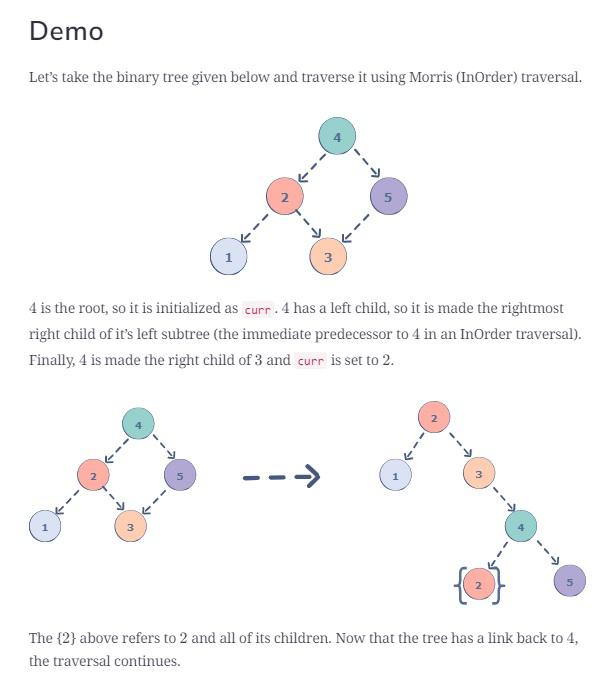
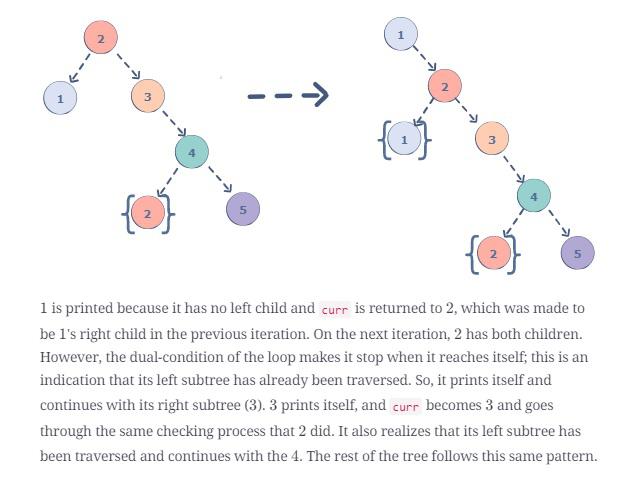
Morris (InOrder) traversal is a tree traversal algorithm that does not employ the use of recursion or a stack. In this traversal, links are created as successors and nodes are printed using these links. Finally, the changes are reverted back to restore the original tree.

10 minutes to review the algorithm
Morris traversal Algorithm

  • Initialize the root as the current node curr.
  • While curr is not NULL, check if curr has a left child.
  • If curr does not have a left child, print curr and update it to point to the node on the right of curr.
  • Else, make curr the right child of the rightmost node in curr's left subtree.
  • Update curr to this left node.

Illustration | Demo | https://www.educative.io/answers/what-is-morris-traversal
It is a good investment to spend 10 minutes to go over a demo before spending time to read C# solution.
image

image

Test cases | Debugging | Tree restored | First node 1 in inorder | Second node 2 in inorder
It is definitely a good exercise to run the debugger, and then track the demo tree first node with value 1 in inorder traversal, and then second node with value 2 in inorder traversal. Rest should be easy. I found out that it is so interesting for me to learn this Morris order traversal with this demo tree.

The following C# code passes online judge.

using System;
using System.Collections.Generic;
using System.Diagnostics;
using System.Linq;
using System.Text;
using System.Threading.Tasks;

namespace _94_inorder_traversal
{
    class Program
    {
        public class TreeNode
        {
            public int val;
            public TreeNode left;
            public TreeNode right;
            public TreeNode(int val = 0, TreeNode left = null, TreeNode right = null)
            {
                this.val = val;
                this.left = left;
                this.right = right;
            }
        }

        static void Main(string[] args)
        {
            var root = new TreeNode(4);
            root.left = new TreeNode(2);
            root.right = new TreeNode(5);
            root.left.left = new TreeNode(1);
            root.left.right = new TreeNode(3);            

            var list = InorderTraversal(root);
            Debug.Assert(string.Join(",", list).CompareTo("1,2,3,4,5") == 0);
        }

        /// <summary>
        /// study code
        /// This is C# implementation with Morris In-Order traversal.
        /// Time complexity is O(n)
        /// Space complexity is O(1)
        /// https://leetcode.com/problems/binary-tree-inorder-traversal/discuss/441037/C-Morris-InOrder-Traversal
        /// study Morris traversal
        /// https://www.educative.io/answers/what-is-morris-traversal
        /// Morris (InOrder) traversal is a tree traversal algorithm that does not employ 
        /// the use of recursion or a stack. In this traversal, links are created as successors 
        /// and nodes are printed using these links. Finally, the changes are reverted back to 
        /// restore the original tree.
        /// </summary>
        /// <param name="root"></param>
        /// <returns></returns>
        public static IList<int> InorderTraversal(TreeNode root)
        {           
            var result = new List<int>();

            if (root == null)
            {
                return result;
            }

            var current = root;

            while (current != null)
            {
                if (current.left == null)
                {
                    result.Add(current.val);
                    current = current.right;
                }
                else
                {
                    // make the current node the right child of the rightmost node in curr's left subtree
                    // illustration please the diagram
                    //
                    // find the predec of current
                    var previous = current.left;
                    while (previous.right != null && previous.right != current)
                    {
                        previous = previous.right;
                    }
                
                    if (previous.right == null)
                    {
                        previous.right = current; // node 3.right = node 4
                        current = current.left; // 
                    }
                    else
                    {
                        previous.right = null;
                        result.Add(current.val); // demo tree - first time, node 2 is node 1's right child
                        current = current.right;
                    }
                }
            }
        
            return result;
        }
    }
}

Solution 4 | Need improvement | Weakness in design

Oct. 4, 2018
It is a medium level tree algorithm. I submitted the solution more than four months ago. I like to review the code before I start to work on other 20 medium level tree algorithms. It is also a good idea to share here.

/**
 * Definition for a binary tree node.
 * public class TreeNode {
 *     public int val;
 *     public TreeNode left;
 *     public TreeNode right;
 *     public TreeNode(int x) { val = x; }
 * }
 */
public class Solution {
    public IList<int> InorderTraversal(TreeNode root) // emtpy tree, with one root node, with more nodes
        {
            if (root == null)
            {
                return new List<int>(); 
            }

            var left = InorderTraversal(root.left);
            left.Add(root.val);
            var right = InorderTraversal(root.right);

            // add right to left list <- code review on August 23, 2022, it is not a good practice. 
            if (right.Count > 0)
            {
                foreach (var item in right)
                {
                    left.Add(item);
                }
            }

            return left; 
    }
}

I think that it is better to avoid copying the list from right variable to left. It takes extra time and no need to do that.

Thursday, August 25, 2022

Snowflake vs AWS vs Azure: Top 8 Unique Differences

  on Amazon RedshiftData WarehousesMicrosoft AzureSnowflake • March 25th, 2022 • WRITE FOR HEVO

Data Warehouse is one of the most important Data Science Tools for any business. It provides an organization with a data storage solution. For scalability and reduced administrative tasks, organizations are choosing cloud data storage solutions over on-premise databases. Cloud storage is also more accessible compared to on-premise storage options. 

There are many cloud data warehouses today. Thus, when looking for a cloud data warehouse solution, you will be puzzled by the many options available to you. AWS Redshift, Snowflake, and Azure are some of the popular solutions. To make an effective & economical choice for your individual use case,  a comprehensive comparison is required between Snowflake vs AWS vs Azure. They share several similarities as well as differences. Any business may find it difficult to choose the solution among these three platforms. 

In this article, you will learn about the 8 key differences between Snowflake vs AWS vs Azure.

Table of Contents


  • Amazon Redshift Architecture: AWS Redshift uses the shared-nothing MPP architecture. It is made up of data warehouse clusters with the compute nodes split into node slices. The leader node assigns the individual compute nodes with the code. The system uses industry-standard JDBC or ODBC to communicate with the client applications. 
  • Snowflake Architecture: The Snowflake architecture was made for the cloud and combined with an SQL query engine. It also combines the traditional shared disk with the shared-nothing database architectures which give it three core layers namely database storage, query processing, and cloud services. 
  • Azure Synapse Architecture: Azure Synapse uses a scale-out architecture to distribute the computational processing of data across many nodes. It also separates compute from storage, allowing you to scale out compute independently of the data stored in your system. 

Snowflake vs AWS vs Azure: Performance

  • Amazon Redshift Performance: Redshift offers a fine performance on most data types, but the performance is low when dealing with semi-structured data such as JSON files. To get optimal performance, users are recommended to use the concept of distribution keys. The distribution keys are columns that help to define a database segment for storing a particular row of data. 
  • Snowflake Performance: Snowflake separates compute from storage, which makes it allow for concurrent workloads, letting users run multiple queries at a time. The workloads don’t impact each other, leading to faster performance.
  • Azure Synapse Performance: Its architecture allows for concurrent query processing. Thus, users can extract insights from their data and visualize it faster. 

Snowflake vs AWS vs Azure: Integrations


  • Amazon Redshift Integrations: This is an important factor to consider when comparing Snowflake vs AWS vs Azure. Redshift supports integration with the entire AWS ecosystem, including Amazon DynamoDB, Amazon RDS, Amazon S3, AWS Data Pipeline, AWS Glue, and AWS EMR. It also partners with many other platforms. 
  • Snowflake Integrations: Snowflake offers native connectivity with multiple BI, data integration, and analytics tools such as Azure Data Factory, IBM Cognos, Oracle Analytics Cloud, Google Cloud, Fivetran, and many others. 
  • Azure Synapse Integrations: Azure comes with many integration tools such as logic apps, API Management, Service Bus, and Event Grid to enable you to connect to a wide variety of third-party services. It also supports native integration with BI, operational databases, and ML software. 

Snowflake vs AWS vs Azure: Security


  • Amazon Redshift Security: As far as security is concerned, both the user and AWS have responsibilities to ensure the data is secure. AWS takes care of the security of the cloud while the user takes care of the security in the cloud. AWS controls access to Redshift resources at all levels. It is also compliant with ISO, HIPAA BAA, PCI, and SOC 1,2,3 standards. 
  • Snowflake Security: Snowflake is a very secure cloud platform and complies with many data protection standards including SOC 1 Type 2, SOC 2 Type 2 for all Snowflake editions and HIPAA, HITRUST, and PCI DSS for the Business Critical Edition or higher. It has also implemented controlled access management and data security by encrypting all data and files. 
  • Azure Security: Azure offers several data protection services for both cloud and on-premise workloads. These services include access management, information security, threat protection, network security, and data protection. It has over 90 compliance certificates including HITRUST, ISO, NIST CSF, HIPAA, and many others. 

Snowflake vs AWS vs Azure: Data Backup and Recovery


  • Amazon Redshift Data Backup and Recovery: Redshift has an advanced system for both manual and automated snapshots. The snapshots facilitate recovery in case of the occurrence of an unseen event. The snapshots are stored in S3 using an encrypted SSL connection. 
  • Snowflake Data Backup and Recovery: Snowflake uses fail-safe rather than backup. The fail-safe approach offers a 7-day period during which any Snowflake data that might have been lost is recovered. 
  • Azure Data Backup and Recovery: Microsoft has the built-in Azure Backup feature for backup up and restoring data resources. It scales well to meet your backup storage needs. 

Snowflake vs AWS vs Azure: Use Case 


  • Amazon Redshift Suitable Use Case: Redshift is suitable for any business that deals with large-scale data and where queries need a quick response. It is also a good solution for businesses looking for a data warehouse solution with a transparent pricing model and little to no administrative costs. 
  • Snowflake Redshift Suitable Use Case: Snowflake is suitable for companies looking for an easy-to-deploy data warehouse solution with nearly unlimited, automatic scaling and high performance. 
  • Azure Use Case: Azure Synapse is a suitable solution for any company looking for an enterprise data warehouse with a great price/performance ratio. It is also good for companies that use Microsoft products and are in need of seamless integrations. 

Snowflake vs AWS vs Azure: Price


  • Amazon Redshift Price: Redshift offers different pricing plans. With its on-demand pricing feature, you are charged on a per-hour basis. The charges start at $0.25 per hour, but the final cost is calculated depending on the number of nodes in the cluster. With the managed storage pricing approach, users are charged based on the volume of data each month. 
  • Snowflake Pricing: Snowflake uses a tiered pricing approach tailored to customer needs and requirements. It also has pre-purchase and on-demand pricing plans. The usage of compute and storage are separated, and the former is billed separately on a per-second basis. 
  • Azure Pricing: Azure Synapse divides its pricing into compute charge and storage charge. When you pause it, you will only incur storage charges. It doesn’t charge upfront costs and termination fees. 

Snowflake vs AWS vs Azure: Customer Support


  • Amazon Redshift Customer Support: You can contact the AWS support team by filling a form on the official AWS website. They will get back to you within 1 business day via phone or email. 
  • Snowflake Customer Support: The Snowflake team allows you to submit your inquiries by filling a form on their website where you provide your email address and phone number. They then get back to you as soon as they can.
  • Azure Support: Azure provides a number of ways through which you can contact them. You can create a support request on their official website and they will respond to your request. You can also tweet them and you will get answers from their experts. You can also connect with community support to get answers from Microsoft Engineers and the Azure community experts. 

That is how Snowflake vs AWS vs Azure compare to each other. 

Snowflake vs AWS vs Azure Summary


Conclusion

In this article, you learned about the key differences between Snowflake vs AWS vs Azure. Businesses are opting for cloud storage solutions over on-premise storage options for the storage of their data. This can be attributed to a number of benefits offered by cloud storage platforms including less maintenace and accessibility. There are many cloud storage options available today, thus, you may find it difficult to choose the right solution from the many available options. Amazon Redshift, Snowflake, and Azure Synapse are all cloud data warehouse platforms. They provide businesses with cloud storage solutions. Knowing the differences between Snowflake vs AWS vs Azure will help you choose the right cloud storage platform for your unique needs. 

As you collect and manage your data across several applications and databases in your business, it is important to consolidate it for complete performance analysis of your business. However, it is a time-consuming and resource-intensive task to continuously monitor the Data Connectors. To achieve this efficiently, you need to assign a portion of your engineering bandwidth to Integrate data from all sources, Clean & Transform it, and finally, Load it to a Cloud Data Warehouse like Amazon Redshift or Snowflake, BI Tool, or a destination of your choice for further Business Analytics. All of these challenges can be comfortably solved by a Cloud-based ETL tool such as Hevo Data.